
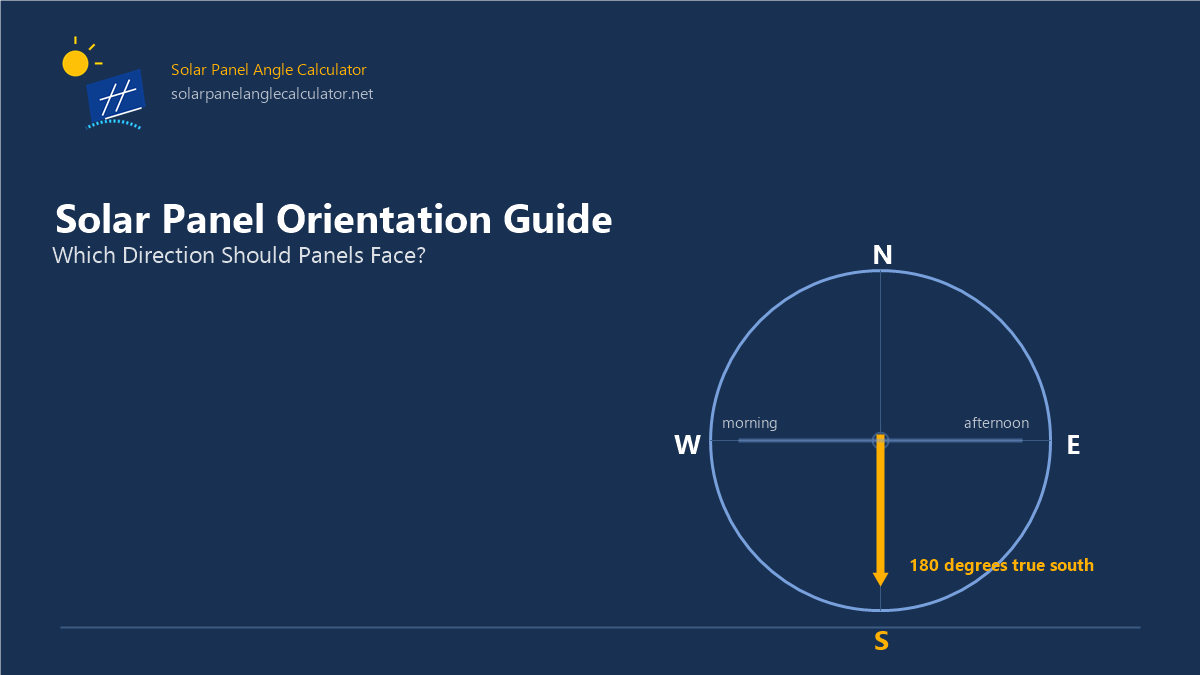
Orientation is measured as an azimuth angle from true north, never from a raw magnetic compass reading, magnetic declination bends the needle up to 20 degrees off true north. The measurement methods stay simple: a GPS compass reports true bearings directly, and a solar-noon shadow points true north without any instrument. Roof type sets how much orientation freedom exists, one face on a gable, four on a hip, any direction on a flat roof with a 10-degree tilted rack.
The output stakes stay small near the optimum and large far from it. A roof face within 10 to 15 degrees of the equator azimuth loses 1 to 1.5 percent of annual generation; a full east or west facing loses 20 to 25 percent; orientation errors outweigh equivalent tilt errors at mid-to-high latitudes. The latitude angle sets the scale on every one of those numbers, the same 20-degree azimuth error costs more at 47 degrees north than at 25 degrees north, because the higher-latitude sun path concentrates into a narrower equator-facing window. The Solar Panel Angle Calculator returns the recommended direction, the azimuth value, and the paired tilt together for any city, ZIP code, or coordinates, one position, two numbers.
What Is Solar Panel Orientation?
Solar panel orientation is the compass direction a solar panel faces, measured as a solar azimuth angle from true north: due south at 180 degrees in the Northern Hemisphere and due north at 0 degrees in the Southern Hemisphere. Orientation and tilt angle combine into one panel position, orientation sets the horizontal facing, tilt sets the vertical inclination, and the Solar Panel Angle Calculator returns both values together for any location. A panel oriented at the equator-facing azimuth with a latitude-matched tilt generates the maximum solar output a fixed mount delivers.
Orientation answers the horizontal half of the positioning question. The azimuth scale runs clockwise from true north: east at 90 degrees, south at 180 degrees, west at 270 degrees, the solar panel compass direction every orientation result reports. The sun's position in the sky plots on two angles, azimuth across the compass and zenith, the angle looking up from the horizon toward the point directly overhead. Orientation sets the azimuth half; tilt sets the zenith half by deciding how the panel plane leans into the sun's height. Every roof face carries one azimuth value, and every orientation decision starts from that number.
Why Do Solar Panels Face the Equator?
Solar panels face the equator because the sun spends its productive hours on the equator-facing half of the sky, so a south-facing panel in the Northern Hemisphere or a north-facing panel in the Southern Hemisphere captures the widest, longest solar window. The sun arcs from east to west through the day and shifts height with the season. At solar noon, the sun's highest point, between 12:00 and 14:00 clock time depending on location, the equator-facing panel meets the sun's rays closest to perpendicular, and a perpendicular strike generates the maximum energy per unit of panel surface.
The seasonal solar path sets the width of that window. In London at 51.5 degrees north, the sun path spans 262 degrees at the summer solstice and shrinks to 104 degrees at the winter solstice; the noon elevation drops from 62 degrees in June to 15 degrees in December. Winter sun reaches the panel through more atmosphere at a lower angle, so winter radiation runs weaker than summer radiation, and the winter sun stays on the equator-facing side all day, which concentrates the orientation value exactly when hours are shortest.
Orientation trades against tilt, not with it. A panel aimed at the equator with the wrong tilt still catches the sun's arc; a panel aimed away from the equator misses the arc at any tilt. This asymmetry is why orientation fixes come before tilt adjustments on every existing roof.
Which Direction Should Solar Panels Face?
Solar panels should face due south in the Northern Hemisphere and due north in the Southern Hemisphere; east-facing shifts production into the morning, west-facing shifts it into the afternoon, and each step away from the equator direction costs output. The six practical directions below cover every roof face.
The following table shows the six solar panel directions with their azimuth values from true north, the production timing each direction creates, and the best use for each facing.
| Direction | Azimuth (true north = 0) | Production timing | Best use |
|---|---|---|---|
| South | 180° | Broad midday emphasis | Maximum annual output, Northern Hemisphere |
| Southeast | 135° | Earlier-day emphasis | Morning-weighted production |
| East | 90° | Morning | Morning electricity loads |
| Southwest | 225° | Later-day emphasis | Afternoon-weighted production |
| West | 270° | Afternoon | Late-day loads, time-of-use rates |
| North | 0° | Hemisphere-dependent | Southern Hemisphere optimum |
The azimuth value decides the production clock. South at 180 degrees centers generation on the middle of the day. East at 90 degrees moves the peak before noon. West at 270 degrees moves it after. Deviation from the equator-facing azimuth costs 0.5 to 1.5 percent of annual output per 10 degrees at mid latitudes, and 20 to 25 percent for a full east or west facing.
What Makes South-Facing Solar Panels the Default?
South-facing solar panels are the Northern Hemisphere default because a 180-degree azimuth faces the sun's longest daily arc. The south-facing window collects the midday hours when solar radiation runs strongest, and it holds that advantage in every season, the winter sun tracks the southern sky all day in the Northern Hemisphere. A south-facing roof with a latitude-matched tilt angle delivers close to the maximum solar generation a fixed array produces at its location, which is why homeowners plan around solar panels facing south.
South-facing is the default, not the only workable direction. A roof that faces southwest or southeast keeps most of the annual output, within 10 to 15 degrees of south, the loss runs 1 to 1.5 percent. Homeowners checking an existing roof confirm the facing with one question: does the main roof face catch midday sun? A roof face that receives direct sun from late morning through early afternoon faces close enough to south for full solar output.
Do North-Facing Solar Panels Work?
North-facing solar panels work as the optimum in the Southern Hemisphere and as a reduced-output compromise in the Northern Hemisphere. Hemisphere flips the rule: in Australia, South Africa, and South America, the north-facing roof is the equator-facing roof, and panels mounted there generate the maximum. Melbourne at 37.8 degrees south runs its best arrays at a north-facing azimuth with a 38-degree tilt, the same geometry a south-facing array uses in the Northern Hemisphere at the mirrored latitude.
In the Northern Hemisphere, a north-facing roof faces away from the sun's arc. Steep north roof planes catch diffuse light and brief summer sun that clears the ridge on long June days, and output drops 20 to 40 percent against an equator-facing array depending on pitch and shade. The workable alternatives: mount panels on a different roof face, use a ground mount in the yard where orientation is free, or run the numbers on the north face with the calculator before ruling it out, the north-facing loss shrinks at low pitch on mild-latitude sites.
What About East- and West-Facing Roofs?
East, and west-facing roofs shift solar production to the morning or the afternoon. An east-facing array peaks before noon; a west-facing array peaks after. Combined annual output runs 20 to 25 percent below an equator-facing array, but the timing carries value under time-of-use electricity rates that price late-afternoon power highest. The East vs West Facing Solar Panels page compares the two directions by load timing, latitude, and rate structure for owners choosing between them.
How Do You Measure Solar Panel Orientation?
Measure solar panel orientation by converting the roof's compass direction into a true-north azimuth value, using a GPS compass or a magnetic compass corrected for magnetic declination. A magnetic compass needle points to magnetic north, which sits off true north by the local declination, up to 20 degrees across the United States, and an uncorrected reading misaims the array by that full amount. The True South vs Magnetic South page explains the declination correction, the compass method, and the solar-noon shadow check that needs no compass at all.
Three measurement methods cover every situation:
- GPS smartphone compass, reports true bearings directly, declination already applied
- Magnetic compass plus declination, subtract east declination, add west declination, per the local value
- Solar-noon shadow, a vertical pole's shadow at local solar noon points true north in the Northern Hemisphere
The azimuth-from-true-north convention keeps every measurement consistent with the calculator. A due-south roof face reads 180 degrees; the Solar Orientation Calculator converts any address into its roof-azimuth context and pairs the direction result with the tilt result.
How Does Roof Orientation Change with Roof Type?
Roof orientation changes with roof type because the number of usable roof faces and the roof pitch decide which azimuth values exist to use: a single-slope shed roof carries one orientation, a gable carries two opposite faces, and a flat roof carries any orientation the mounting system sets. Pitch interacts with facing, a steep roof face aimed off-south loses less than a shallow face at the same azimuth, because the steep plane still tilts toward the midday sun.
The following table shows how four common roof types change the orientation choice.
| Roof type | Usable faces | Orientation freedom | Best practice |
|---|---|---|---|
| Gable | 2 opposite faces | One face near south, one near north | Mount on the equator-facing face |
| Hip | 4 sloped faces | Two faces usable in most orientations | Pick the face closest to the equator azimuth |
| Shed / single slope | 1 face | Fixed by the building | Match tilt to compensate a non-south facing |
| Flat | Any orientation | Set entirely by the mounting system | Tilt at 10 degrees minimum, face the equator |
A flat roof removes the orientation constraint at the cost of a mounting decision. Panels on a tilted rack at 10 degrees or more face any direction the layout allows, and the 10-degree minimum keeps rain washing dust off the glass, a flat-mounted panel at 0 degrees pools water, soils faster, and forfeits the self-cleaning that tilted panels get free.
How Much Output Does Orientation Affect?
Orientation affects solar output less than most owners expect near the optimum and more than most expect far from it: a roof face within 10 to 15 degrees of the equator azimuth loses 1 to 1.5 percent, while a full east or west facing loses 20 to 25 percent of annual generation. Clean Energy Council output data for Australian cities shows the pattern by latitude: flat-roof arrays generate 96 percent of optimum in Darwin at 12 degrees latitude, 87 to 88 percent in Sydney and Perth near 32 to 34 degrees, and 82 percent in Hobart at 43 degrees, the flatter the roof and the higher the latitude, the larger the orientation-and-tilt loss.
Orientation errors cost more than equivalent tilt errors at mid-to-high latitudes. A 20-degree azimuth error loses 2 to 4 percent of annual output; a 20-degree tilt error loses 4 to 8 percent but stays recoverable by steepening. The asymmetry sets the repair order on an existing roof: fix the facing first, a re-aimed rack or a different roof face, then tune the tilt.
What Inputs Belong in an Orientation Check?
An orientation check needs 6 inputs: the roof face direction, the azimuth value, the magnetic declination, the shade survey, the roof pitch, and the mount type. Each input feeds the orientation decision the same way each field feeds the Solar Panel Angle Calculator.
- Roof face direction, which way the candidate roof plane faces
- Azimuth value, the direction converted to degrees from true north
- Magnetic declination, the local compass correction, east or west
- Shade survey, trees, buildings, and other panels across the sun path by season
- Roof pitch, the tilt the roof itself supplies
- Mount type, flush, rack, ground, or pole, which sets how much orientation freedom exists
The shade survey outweighs a perfect azimuth. A south-facing roof shaded every afternoon generates less than an unshaded west-facing roof, because shaded panels lose their direct radiation entirely while off-aim panels lose a fraction.
What Mistakes Distort Solar Panel Orientation?
The 6 mistakes below each break the orientation decision at a different step, measurement, hemisphere, or layout.
- Reading a magnetic compass as true north, the declination error aims the array off by the full local offset
- Applying the wrong hemisphere default, pointing panels south in Australia or north in the United States inverts the optimum
- Ignoring seasonal shade, a winter-bare tree shades the low winter sun that orientation exists to catch
- Forcing one azimuth on every roof face, a hip roof's second-best face beats its worst face
- Assuming a flat roof has no orientation, the rack orientation still sets the production clock
- Copying another region's rule, latitude and hemisphere change which direction and how much deviation costs
How Do You Find Your Panel Direction with the Calculator?
Find your panel direction with the Solar Panel Angle Calculator: enter a city, ZIP code, or coordinates, and the results dashboard returns the recommended direction, south or north, alongside the azimuth value 180 or 0 degrees and the paired tilt angle. The Solar Orientation Calculator expands the direction result with per-address azimuth context for owners mapping a specific roof.
The workflow takes 4 steps:
- Enter your location in the calculator's location field
- Enter the roof direction or leave it for the calculator's default equator-facing result
- Read the recommended direction and azimuth from the results dashboard
- Record the direction with its tilt, one position, two numbers, both from the same calculation
The direction result pairs with the tilt result by design. A 180-degree azimuth with a 34-degree tilt describes one complete panel position for a Los Angeles roof; the same azimuth with a 48-degree tilt describes the winter position of the same array. The Seasonal Solar Panel Tilt Guide carries the tilt half of that position through the seasons.
Solar Panel Orientation FAQs
Does orientation matter more than tilt angle? Orientation matters more at mid-to-high latitudes. A 20-degree azimuth error costs 2 to 4 percent of annual output while a 20-degree tilt error costs 4 to 8 percent, but tilt errors stay cheap to fix on an adjustable mount, while a wrong roof facing fixes only by changing roof faces. Near the equator, neither variable moves output far.
Can panels face north in the Northern Hemisphere? Panels can face north in the Northern Hemisphere at reduced output, 20 to 40 percent below an equator-facing array depending on pitch, shade, and latitude. Steep north faces on mild-latitude roofs lose the least. The Southern Hemisphere reverses the rule: north-facing is the optimum there.
What if my roof faces northeast or northwest? A northeast or northwest roof face sits 45 degrees off the equator azimuth and typically loses 7 to 12 percent of annual output, more than southeast or southwest faces lose, less than a full east or west facing. Two-compas-direction faces on a hip roof make the closest-to-south face the mounting face.
Does orientation change with the season? Orientation stays fixed through the seasons. The equator-facing azimuth serves every month; the tilt is the variable that shifts. A seasonal adjustment changes the panel angle, never the panel direction.
Is a south-facing slope always the best roof for solar? A south-facing slope is the best single roof face for solar in the Northern Hemisphere when it clears shade. An unshaded east or west face outperforms a south face shaded through peak hours, and a flat roof with oriented racks matches a south slope while simplifying layout.
What azimuth value is due south? Due south is 180 degrees on the true-north azimuth scale. Due east reads 90, due west reads 270, and due north reads 0 or 360. The Solar Panel Angle Calculator reports the recommended azimuth, 180 or 0, with every result.
Sources: NOAA Solar Calculator · NOAA World Magnetic Model · NASA